Understanding Cadio: A Modern Display Font for Versatile Design Needs
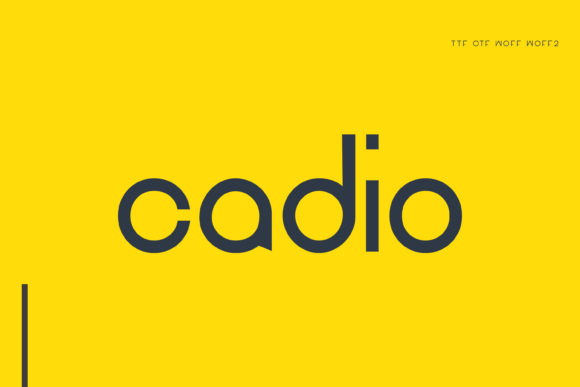
Cadio is a contemporary display font that stands out due to its clean, minimalist design and versatile application. Unlike many fonts that are limited to specific uses, Cadio offers a balance between readability and visual appeal, making it suitable for a wide range of creative projects. Its simple yet refined letterforms ensure clarity while maintaining an elegant presence on the page or screen.
What Makes Cadio Unique?
One of the key features that set Cadio apart is its modern aesthetic. Designed with geometric precision, each character in Cadio maintains uniformity in stroke weight and spacing, contributing to a cohesive and professional look. The font’s subtle serifs and open apertures enhance legibility without compromising on style, which is especially valuable when using it in both digital and print formats.
Cadio also includes a variety of stylistic options, such as alternate characters and weights, allowing designers to customize their typographic choices without switching fonts entirely. This flexibility supports creative expression while ensuring consistency across different elements of a design project.
Strengths and Tradeoffs of Using Cadio
As a display font, Cadio excels in environments where visual impact matters more than long-form readability. It works particularly well for headlines, logos, titles, and short text blocks in branding materials, websites, and marketing collateral. Because of its simplicity, it avoids overwhelming the viewer and instead draws attention through elegance and clarity.
However, like many display fonts, Cadio may not be ideal for body text in large volumes. While it can handle short paragraphs, extended reading could become fatiguing due to its design focus on aesthetics over dense content readability. Designers should consider this limitation when choosing typography for articles, reports, or other long-form texts.
Best-Fit Situations for Cadio
- Brand Identity: Cadio’s sleek and modern appearance makes it an excellent choice for creating logos, business cards, and other brand assets that need to reflect professionalism and minimalism.
- Web Design: When used for headings, navigation menus, or call-to-action buttons, Cadio enhances the user experience by combining visual appeal with clear communication.
- Print Materials: Brochures, posters, and packaging benefit from Cadio’s crisp lines and balanced proportions, especially in high-resolution printing scenarios.
- App Interfaces: Mobile and desktop applications often require a font that is both stylish and functional; Cadio fits this requirement by offering a clean layout that complements UI elements effectively.
Comparing Cadio with Other Display Fonts
In the world of typography, display fonts come in many styles — from bold and decorative to subtle and understated. Cadio falls into the latter category, offering a streamlined approach compared to more ornate alternatives. For example, when compared to highly stylized fonts like Bebas Neue or Bangers, Cadio provides a more polished and mature look that aligns better with professional or minimalist design themes.
When evaluating Cadio against sans-serif display fonts such as Montserrat or Raleway, it holds its own by incorporating slight serif details that add sophistication without complexity. These subtle touches make Cadio feel more grounded and refined, appealing to those who prefer a touch of class in their typography choices.
How Cadio Stands Out in Typographic Categories
Cadio blends characteristics from multiple typographic categories, including geometric sans-serif and neo-grotesque styles. This hybrid nature allows it to adapt to various design contexts. In comparison to traditional serif fonts like Times New Roman or Georgia, Cadio feels more contemporary and suited for modern audiences who expect a cleaner visual language.
Its neutrality also means it doesn’t carry strong historical connotations, unlike some classic typefaces. This makes it easier to integrate into diverse design systems without clashing with existing elements. Whether you're designing a tech startup's website or a luxury fashion label's brochure, Cadio maintains a sense of balance and appropriateness.
Considerations When Choosing Cadio
Before deciding to use Cadio, it’s important to evaluate how well it aligns with your design goals. Ask yourself the following questions:
- Do I need a font that conveys professionalism and modernity?
- Will the font be used primarily for headlines or short bursts of text rather than full paragraphs?
- Is my audience likely to appreciate a minimalist, clean typographic style?
- Does the font pair well with the other design elements I’m working with?
If these questions align with your needs, then Cadio is a strong contender. However, if your project requires a more expressive or vintage font, you might want to explore other options within the display or decorative font families.
Pairing Cadio with Supporting Typefaces
To create a harmonious typographic hierarchy, Cadio pairs well with more utilitarian typefaces for body text. Commonly recommended combinations include pairing it with a sans-serif like Open Sans or a serif like Merriweather. This contrast ensures that the headline remains visually engaging while the supporting text remains easy to read.
For a fully modern aesthetic, consider using a complementary geometric sans-serif. On the other hand, for a more classic look, a transitional serif could offer the right balance. The versatility of Cadio lies in its ability to work with a wide range of secondary fonts without overshadowing them.
Real-World Applications and Use Cases
Cadio has been adopted in various industries and platforms, showcasing its broad usability. Here are a few examples:
- Corporate Websites: Companies in the finance, healthcare, and technology sectors often use Cadio for headers and banners to maintain a professional and trustworthy image.
- E-commerce Branding: Retail brands looking to present a fresh and modern shopping experience frequently choose Cadio for product names and promotional banners.
- Mobile App UI: With its compact and readable form, Cadio serves as a great title font in mobile app interfaces, especially in apps targeting young professionals or minimalist users.
- Event Posters: Event designers have found Cadio useful for creating eye-catching event titles while keeping the overall design uncluttered and elegant.
These real-world implementations highlight how Cadio adapts to different mediums and purposes while maintaining its core identity as a clean and modern font.
Limitations and Alternatives to Consider
While Cadio is highly adaptable, it does have certain limitations. As mentioned earlier, it’s best suited for short text and display purposes. If your project involves extensive body copy, you may need to complement it with a more readable font or opt for a different typeface altogether.
Another consideration is its lack of heavy stylistic variations beyond standard weights and alternates. If you’re looking for a font that offers dramatic transformations (like swashes, ligatures, or varying stroke widths), Cadio may not be the most suitable option. Instead, you might want to explore other display fonts that provide greater customization at the cost of simplicity.
Additionally, for designs requiring cultural or regional specificity, there may be more appropriate fonts available in localized scripts or with unique character sets. Always assess whether Cadio meets the linguistic and stylistic requirements of your target market before finalizing your selection.
How to Evaluate Cadio for Your Project
Evaluating a font like Cadio requires a practical approach that considers both visual and functional aspects. Start by testing it in the context of your actual design. How does it look alongside your color palette and imagery? Does it maintain visibility at smaller sizes or on lower-resolution screens?
You should also consider the emotional tone it conveys. Is it too neutral for your brand’s personality? Or does it match the desired vibe perfectly? Cadio tends to lean toward a calm and confident tone, which may or may not align with your project’s messaging.
Finally, think about scalability. Can it be used consistently across all platforms and media types? Cadio’s structured design ensures that it scales well from small digital displays to large billboards, making it a reliable choice for multi-platform campaigns.
Tools and Resources for Working with Cadio
To get started with Cadio, you’ll typically access it through a font licensing platform or directly from the designer’s portfolio. Once installed, it can be used in any design software that supports custom fonts, such as Adobe Illustrator, Photoshop, Figma, or Sketch.
Some designers may also prefer to use online tools like Google Fonts or Adobe Fonts to preview how Cadio looks in different settings before committing to a purchase or download. These platforms allow you to test the font across various background colors, text sizes, and line heights, helping you determine its effectiveness for your specific needs.
If you’re integrating Cadio into web projects, ensure that you follow proper font embedding practices to maintain performance and accessibility. Web-safe fallbacks should always be considered to support users with slower connections or outdated browsers.
Conclusion
Cadio is a versatile and aesthetically pleasing display font that offers a modern take on clean typography. Its strengths lie in its readability, adaptability, and professional appearance, making it a popular choice among designers seeking a reliable go-to font for a variety of applications. While it may not be perfect for every situation, understanding its capabilities and limitations will help you determine whether it’s the right fit for your next project.
Ultimately, the decision to use Cadio depends on your specific design needs, audience expectations, and the overall message you wish to convey. By considering these factors and testing it in real-world scenarios, you can make a well-informed choice that enhances your design without compromising functionality.