Snow Town: Elevating Your Holiday Designs Without the Common Pitfalls
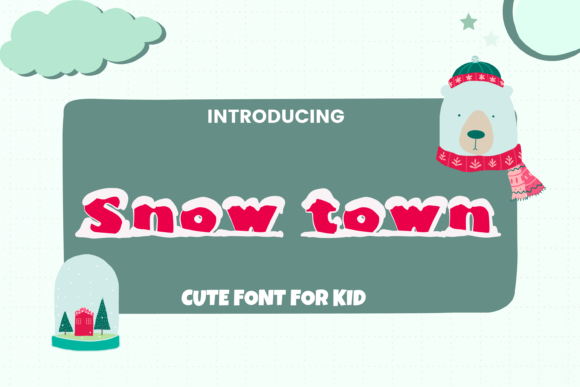
If you are looking to inject a sense of whimsy and seasonal warmth into your projects, Snow Town is likely already on your radar. This big, cute display font has quickly become a favorite among creators who want to capture the magic of winter without sacrificing readability or style. Whether you are designing greeting cards, planning a classroom decoration scheme, or setting up for a festive party, this typeface offers a distinct personality that standard sans-serifs simply cannot match.
However, using a decorative display font like Snow Town requires more than just dragging it onto a canvas. Many designers, particularly those new to typography, make critical errors when incorporating such distinctive characters into their work. These mistakes can lead to poor legibility, unprofessional presentations, or even licensing issues. Understanding the nuances of how to apply this specific font will ensure your holiday designs look polished, intentional, and truly effective.
Understanding the Appeal of Snow Town
Snow Town is characterized by its rounded, playful letterforms and generous spacing, which give it a "big" presence on the page. It is not designed for body text; rather, it is a display font meant to grab attention immediately. Its aesthetic leans heavily into the cozy, nostalgic feelings associated with snow-covered villages and holiday cheer. This makes it an excellent choice for headlines, titles, and short phrases where visual impact is prioritized over dense information delivery.
The font’s versatility allows it to bridge the gap between childish cuteness and sophisticated seasonal branding. For educators, it can make classroom materials feel inviting. For small business owners, it can add a personal touch to packaging labels. The key to leveraging this appeal lies in recognizing that its strength is in its brevity and context.
Common Mistakes in Font Selection and Usage
One of the most frequent errors users make is attempting to use Snow Town for long paragraphs of text. Because of its heavy weight and decorative nature, reading extended passages in this font causes eye strain and reduces comprehension. When you try to force a display font into a role it was not built for, you undermine the very message you are trying to communicate. Instead, reserve Snow Town for headlines, subheads, or isolated words. Pair it with a clean, simple sans-serif or serif font for any supporting copy. This contrast creates a hierarchy that guides the reader’s eye and maintains professionalism.
Another oversight involves ignoring the scale at which the font is viewed. Snow Town is designed to be seen from a distance or at large sizes. If you shrink it down too much, the details get lost, and the letters may appear muddy or illegible, especially in digital formats with lower resolution. Always preview your design at the actual size it will be displayed. A headline that looks great on a monitor might fail completely when printed on a small gift tag.
Practical Applications and Best Practices
To get the most out of Snow Town, consider the medium you are working with. Digital designs offer more flexibility with screen resolutions, but print media requires careful attention to color contrast and background texture. Here are some practical ways to integrate this font effectively:
- Holiday Cards: Use Snow Town for the recipient's name or the main holiday greeting. Keep the rest of the card minimal to let the font shine. Avoid cluttering the layout with too many competing elements.
- Party Decorations: For banners or signs, ensure the font size is substantial. Large-scale printing brings out the best in the font’s curves. Consider adding subtle textures, like a faint snowflake pattern, behind the text to enhance the theme without distracting from the words.
- Classroom Decor: Educators can use Snow Town for subject headers or motivational quotes. It helps create a welcoming atmosphere. However, ensure that the surrounding instructional text remains highly readable to avoid confusing students.
When decorating classrooms or parties, think about the overall color palette. Snow Town often works beautifully with cool tones like icy blues, whites, and silvers, but it also pops against warm reds and greens. Experiment with these combinations to find what resonates with your specific audience. Remember that whitespace is your friend; giving the letters room to breathe prevents the design from feeling overwhelming.
Evaluating Quality and Licensing
Before downloading or purchasing Snow Town, it is crucial to verify the source and the license terms. Not all fonts available online are created equal. Some may have incorrect kerning (the space between letters), which can cause awkward gaps or collisions in your design. High-quality fonts are meticulously crafted to ensure smooth visual flow. Additionally, always check the licensing agreement. Are you allowed to use it for commercial purposes? Can you modify it? Misunderstanding these terms can lead to legal issues or unexpected costs later on.
For professionals and entrepreneurs, investing in a properly licensed font is part of maintaining brand integrity. Cheap, pirated fonts often come with hidden risks, including malware or inconsistent rendering across different devices. By choosing a reputable source, you ensure that your Snow Town files are safe, high-resolution, and ready for both web and print use. This peace of mind allows you to focus on creativity rather than troubleshooting technical glitches.
Enhancing Readability and Aesthetics
To further refine your use of Snow Town, pay close attention to alignment and spacing. Centered text often looks charming with display fonts, especially for short greetings. However, justified text can create uneven gaps that disrupt the rhythm of the letters. Stick to left-aligned or centered layouts for the most consistent results. Furthermore, consider adding slight tracking (letter-spacing) if the letters feel too cramped together. This small adjustment can significantly improve clarity and elegance.
Color plays a pivotal role in how Snow Town is perceived. While black is a safe choice, experimenting with gradient fills or metallic effects can add depth and luxury to your designs. Just ensure that the contrast ratio between the text and background is sufficient for accessibility. Low-contrast combinations, such as light gray text on a white background, can render the font invisible or difficult to read, defeating the purpose of using a bold display typeface.
Final Thoughts on Creative Confidence
Using Snow Town successfully comes down to restraint and intentionality. It is a powerful tool for setting a mood, but it should never overshadow the content it supports. By avoiding common pitfalls like overuse, poor scaling, and unclear licensing, you can create designs that are not only visually appealing but also functional and professional. Take the time to experiment with pairings, test your prints, and respect the font’s unique character. When done right, Snow Town can transform ordinary projects into memorable holiday experiences that resonate with your audience.
Whether you are a seasoned graphic designer or a hobbyist putting together a last-minute party invitation, understanding the strengths and limitations of your tools is essential. Let Snow Town bring the joy of the season to your work, but always prioritize clarity and quality. Your audience will appreciate the care you put into every detail, resulting in designs that are both beautiful and effective.