Rippple: A Wavy, Creative Font for Designers and Content Creators
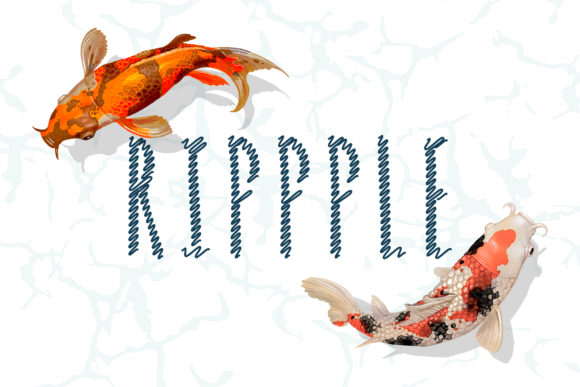
If you're looking to add a unique, artistic flair to your design projects, Rippple is a font that stands out with its wavy and curly character style. Inspired by the fluid motion of sea waves, this creative uppercase font brings an organic, handcrafted feel to logos, posters, book covers, and more. But while Rippple’s aesthetic appeal is undeniable, choosing and using it effectively requires attention to detail and a clear understanding of when and how it works best.
Why Choose Rippple?
Rippple is ideal for designers who want to evoke creativity, movement, and emotion in their visual work. Its flowing characters make it perfect for:
- Logo design – especially for brands related to nature, art, or water-based themes
- Book covers – where a bold and memorable title can capture attention
- Posters and promotional materials – for creating dynamic and eye-catching headlines
- Web design – as accent or display text in headers and banners
- Print media – such as invitations, packaging, or branding collateral
The font’s stylized curves and rhythm mimic the natural ebb and flow of ocean waves, making it a go-to choice for anyone aiming to convey a sense of motion or inspiration. However, like any specialized font, Rippple has its own set of considerations to ensure it enhances rather than hinders your project.
Common Mistakes When Using Rippple
While Rippple offers a distinctive look, some users may overlook key aspects that affect how it functions across different platforms and designs. Here are some common missteps and how to avoid them:
1. Using It in Small Text Sizes
Rippple’s intricate wave patterns can become difficult to read if used at small sizes. Many beginners try it for body text without realizing it was designed primarily for headlines and display purposes. This can lead to poor readability and a cluttered appearance.
Better approach: Reserve Rippple for large-format text where the details can be appreciated and legibility remains intact. For smaller text, pair it with a simpler sans-serif or serif font that complements its style without competing for attention.
2. Ignoring Color Contrast
Because of its soft, curving form, Rippple can sometimes blend into background images or colors if not contrasted properly. A lack of sufficient contrast between the font and the background might cause the text to lose impact or appear unprofessional.
Better approach: Always test Rippple against your chosen background. Use high-contrast combinations like dark text on light backgrounds or vice versa. Consider adding subtle shadows or outlines to enhance visibility without compromising the font’s elegance.
3. Overusing the Font
Some creators mistakenly apply Rippple throughout an entire design, thinking that “more is better.” This can result in visual fatigue and reduce the effectiveness of the message being conveyed. The font is powerful but should be used strategically.
Better approach: Limit Rippple to one or two key elements per design—like a headline or a call-to-action button. Balance it with more neutral fonts to maintain harmony and guide the viewer’s focus appropriately.
4. Not Checking License Terms Before Downloading or Buying
Many people download or purchase fonts without reading the licensing agreement. With Rippple, it’s important to know whether it allows commercial use, web embedding, or redistribution, depending on your project needs.
Better approach: Always review the font’s license before implementation. If you plan to use it on websites or in apps, confirm that it supports web font formats (like WOFF or TTF) and that you’re compliant with redistribution rules. Some licenses require attribution or restrict usage to personal projects only.
5. Assuming It Works Well in All Languages
Rippple is an uppercase font, which makes it suitable for English and other Latin script languages. However, it may not support special characters or glyphs from non-Latin scripts. Attempting to force it into multilingual contexts can lead to missing or incorrect symbols.
Better approach: Check the font’s character set before using it in a multilingual context. If your project involves text in another language, consider pairing Rippple with a complementary font that includes the necessary characters.
When Rippple Might Not Be the Best Choice
Although Rippple is visually appealing, it isn’t always the right fit. Avoid using it in situations where clarity and quick recognition are crucial, such as:
- Navigation menus
- Legal documents or forms
- Body copy in long articles or reports
- Product labels requiring precise information
In these cases, prioritize fonts that are clean, legible, and optimized for readability. Rippple excels in environments where it can be the focal point rather than the supporting structure of your layout.
How to Evaluate and Compare Rippple with Other Fonts
Choosing the right font often involves comparing multiple options. When evaluating Rippple, consider the following factors:
- Style consistency: Does it match the overall tone and theme of your project? Is it too playful for a serious brand?
- Readability: Can the characters be clearly understood at a glance? Test it in real-world conditions, such as print or digital screens.
- Technical compatibility: Ensure it works well with your design software and supports all required features like kerning, ligatures, or alternate characters.
- License flexibility: Will it meet your current and future usage requirements? Look for scalable or business-friendly licenses if needed.
- Performance on screen: Especially for web designers, verify how the font renders on various devices and browsers to avoid pixelation or distortion.
Comparing Rippple to similar fonts like Ocean Wave, Curly Script, or Zephyr Bold can help you understand its strengths and limitations. Each of these alternatives may offer slightly different levels of curvature, weight, or spacing, so testing them side by side is a smart move.
Practical Tips for Using Rippple Effectively
To maximize the potential of Rippple in your work, keep these tips in mind:
- Use it sparingly: Apply it only where it adds value, such as in titles, taglines, or decorative accents.
- Pair it with complementary fonts: Combine Rippple with a minimalist typeface to create visual balance. For example, pair it with Montserrat or Lato for a modern yet artistic composition.
- Adjust spacing carefully: The wavy nature of Rippple may require manual adjustments to letter and word spacing for optimal aesthetics.
- Test across mediums: Try it on both print and digital mockups to see how it behaves under different lighting and resolutions.
- Consider accessibility: While aesthetics matter, readability is key for inclusivity. Make sure the font doesn’t hinder access for users with visual impairments.
Where to Find and How to Use Rippple
Rippple is available on several font marketplaces and design platforms. You can typically find it listed under categories like “creative,” “handwritten,” or “display” fonts. When downloading or purchasing, always choose a reputable source to ensure quality and legal compliance.
Once you’ve obtained the font, install it on your computer or import it into your design tool (e.g., Adobe Illustrator, Photoshop, Figma, or Canva). For web designers, consider using tools like Google Fonts or Adobe Fonts to embed it easily and efficiently.
Pro tip: Create a style guide for your project that defines when and how to use Rippple. This helps maintain consistency and prevents misuse later on.
Real-World Examples of Rippple in Action
Here are a few scenarios where Rippple shines:
- Coastal Brand Logo: A surf shop uses Rippple for its logo name, paired with a simple sans-serif for contact info and taglines. The contrast draws attention to the main brand identity.
- Travel Poster Headline: A travel agency promotes a beach destination with a large, colorful header in Rippple. The wavy effect mirrors the ocean theme and grabs viewers’ attention instantly.
- Art Book Cover: An artist showcases their portfolio with a cover featuring the title in Rippple. The dynamic style reflects the creative energy of the content inside.
These examples highlight how Rippple can elevate a design when applied thoughtfully. But they also underscore the importance of context and purpose in font selection.
Before You Commit: What to Check
Before finalizing Rippple for your project, ask yourself the following questions:
- Does the font reflect the personality of my brand or message?
- Is it readable at the intended size and placement?
- Will it work well with the colors and imagery I’m using?
- Am I using it in a way that aligns with its design intent?
- Do I have the appropriate license for my usage scenario?
Answering these questions honestly will help you determine whether Rippple is the best fit or if a more conventional option would serve your audience better.
Final Thoughts on Choosing and Using Rippple
Rippple is more than just a pretty font—it's a design element that can influence perception, engagement, and communication. Its wavy, uppercase characters bring a sense of fluidity and creativity to any project. But to get the most out of it, you need to use it wisely and in the right context.
By avoiding common pitfalls like overuse, poor contrast, or mismatched styles, you’ll ensure that Rippple enhances your work instead of detracting from it. Always evaluate your needs before making a decision, and remember that great typography balances beauty with function.
Whether you're designing a website, crafting a poster, or developing a brand identity, Rippple could be the perfect addition—if used correctly. So take the time to understand its strengths, limitations, and proper application. Your audience—and your designs—will thank you for it.