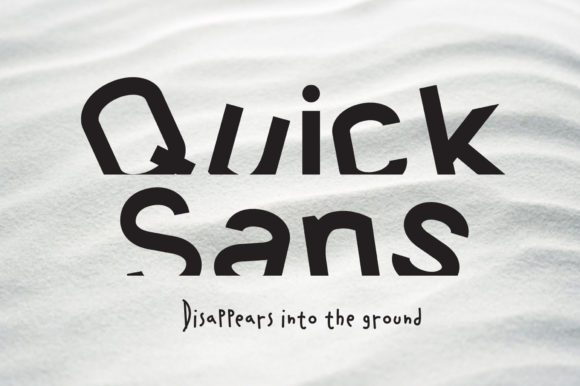
Quick Sans: A Modern Display Font for Creative Projects
Fonts play a crucial role in visual communication, shaping how your message is perceived and remembered. Quick Sans is a display font that stands out with its clean, contemporary design and bold character. It’s not just another sans-serif; it’s a unique typographic solution tailored for creatives who want to make an impact without overcomplicating their designs.
What Is Quick Sans?
Quick Sans is a modern display font that combines geometric precision with subtle personality. Unlike generic sans-serif fonts found in most software, Quick Sans offers a fresh take on readability and style, making it ideal for branding, presentations, invitations, and more. Its versatility allows it to adapt well to both digital and print formats, while maintaining a professional yet eye-catching appearance.
Why Choose Quick Sans?
- Unique aesthetics: The font features slightly angled terminals and balanced spacing, which give it a distinct identity.
- High legibility: Despite being a display font, it maintains excellent clarity even at smaller sizes.
- Wide application: Suitable for titles, logos, stationery, packaging, and web headers.
- Modern appeal: Its design aligns with current trends in minimalism and clean typography.
Common Mistakes When Using Quick Sans
While Quick Sans is visually appealing, it's easy to misuse it if you're not familiar with the best practices. Here are some common pitfalls and how to avoid them.
1. Using It in Body Text Without Caution
Display fonts like Quick Sans are optimized for headlines or short bursts of text—not long paragraphs. One frequent mistake is using it for body copy, especially in print materials or websites where readability is key.
Mistake Example:A blog post uses Quick Sans throughout, leading to eye strain and reduced reader engagement due to poor line spacing and condensed letterforms.
Better Approach:Stick to using Quick Sans for headings, pull quotes, or title cards. For body text, pair it with a more neutral serif or sans-serif font like Lora, Open Sans, or Roboto. This contrast will enhance hierarchy and improve overall readability.
2. Overlooking Licensing and Usage Rights
Many users download a font and assume it’s free for all purposes. However, Quick Sans may have specific licensing terms depending on where it was purchased or downloaded.
Mistake Example:An entrepreneur uses Quick Sans in their product packaging without checking commercial use rights, risking legal issues down the line.
Better Approach:Before using Quick Sans in any project—especially commercial ones—review the font license. Look for clauses about embedding in websites, usage in print, or redistribution. If unsure, contact the font developer or purchase a commercial license to ensure compliance.
3. Neglecting Color and Background Contrast
Quick Sans has a strong presence, but that doesn’t mean it can tolerate poor color choices. Some users overlook the importance of background contrast when applying this font, resulting in diminished visual impact.
Mistake Example:A designer uses Quick Sans in light gray on a white background for a poster, making the text barely visible from a distance.
Better Approach:Always test Quick Sans against different background colors and lighting conditions. Darker shades or high-contrast combinations (like black on white) often work best. Use tools like Adobe Color or Canva’s palette generator to find complementary hues that highlight the font’s sharp edges and modern feel.
4. Skipping Kerning and Tracking Adjustments
Display fonts like Quick Sans often require fine-tuning to look polished. Many beginners apply the font as-is without adjusting spacing between letters or words, which can lead to awkward or unbalanced layouts.
Mistake Example:A logo reads “QUICK SANS” with uneven spacing between the “K” and “S,” making it appear hastily designed.
Better Approach:Use vector design tools like Illustrator or Inkscape to manually adjust kerning (space between two characters) and tracking (overall spacing across a word). Quick Sans typically benefits from slight tightening of letter spacing in larger sizes to maintain a cohesive and professional appearance.
How to Evaluate and Choose Quick Sans for Your Project
Before committing to Quick Sans, consider these practical checks to ensure it fits your needs:
- Test in context: Download a trial version and apply it to mockups of your intended project. See how it looks in real-world scenarios.
- Check compatibility: Confirm that Quick Sans works well with your design software or website builder. Some platforms may not render custom fonts correctly unless properly embedded.
- Consider the audience: Think about who will be viewing your content. Quick Sans is great for younger demographics or modern brands, but may not resonate as strongly with traditional or formal audiences.
- Assess scalability: Zoom in and out to see how the font holds up at different sizes. Display fonts can lose detail when scaled too small or become overwhelming when too large.
Practical Tips for Working With Quick Sans
To get the most out of Quick Sans, follow these tips that help avoid missteps and elevate your design quality:
Pair It Wisely
Font pairing is essential. Quick Sans should ideally be paired with a more subdued typeface for body text. Try combining it with something like Merriweather or Nunito to create balance and guide the viewer’s attention effectively.
Use It Sparingly
Overuse can dilute its impact. Save Quick Sans for the most important elements—like brand names, section headers, or taglines. Let other parts of your layout breathe by using simpler fonts elsewhere.
Optimize for Different Media
Quick Sans may behave differently on screen versus in print. Always review your designs in both formats. Digital projects might need lighter weights or anti-aliased settings, while printed materials could benefit from bolder styles and higher resolution previews.
Stay Consistent
Consistency in typography builds trust and professionalism. Once you choose Quick Sans for a headline, stick to the same weight and style throughout similar sections of your design. Avoid mixing multiple variations unless they serve a clear purpose.
When Quick Sans Might Not Be the Best Choice
Though versatile, there are situations where Quick Sans may not perform optimally:
- If your project requires extensive reading (e.g., books, reports), a more readable font is better.
- In highly formal or traditional contexts, such as legal documents or academic papers, where conservative fonts are expected.
- For languages with complex scripts or diacritics, unless the font supports those characters adequately.
Understanding when to use Quick Sans—and when to hold back—is key to successful design. It’s a powerful tool, but like any font, it has limitations based on context and purpose.
Where to Find and Buy Quick Sans
Quick Sans can be found on various font marketplaces such as Adobe Fonts, Google Fonts, and independent platforms like MyFonts or FontBundles. Always verify the source before purchasing or downloading to ensure authenticity and proper licensing.
Some platforms offer free trials, allowing you to test the font in your actual workflow before buying. Take advantage of these options to evaluate how well Quick Sans integrates into your existing designs.
Final Thoughts on Using Quick Sans Effectively
Quick Sans is more than just a pretty face—it’s a functional display font with broad creative potential. But to harness its full power, you must approach it thoughtfully. Consider the context, audience, and medium before using it, and don’t forget to check licensing agreements and technical specifications.
By avoiding common mistakes and following smart design practices, you’ll ensure that Quick Sans enhances your work rather than hinders it. Whether you’re a small business owner designing a logo, a blogger creating a header, or a marketer crafting a presentation, choosing the right font makes all the difference.
Take time to explore what Quick Sans can do for your project. Test it, refine it, and let its modern charm shine through in the right places. Your audience will notice—and appreciate—the extra care you put into every detail.