Horrraaa: The Ultimate Font for Futuristic and Street Art-Inspired Designs
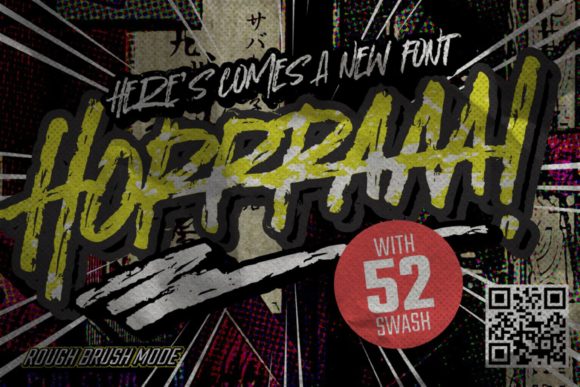
In the ever-evolving world of graphic design, typography plays a pivotal role in capturing attention and conveying a message. One font that’s making waves among designers is Horrraaa. Known for its unique brushed, graffiti-styled appearance, Horrraaa offers a bold, edgy aesthetic with a futuristic twist. Whether you're creating a logo, designing custom t-shirts, or crafting eye-catching advertisements, this display font brings a fresh and modern energy to your work.
What Makes Horrraaa Stand Out?
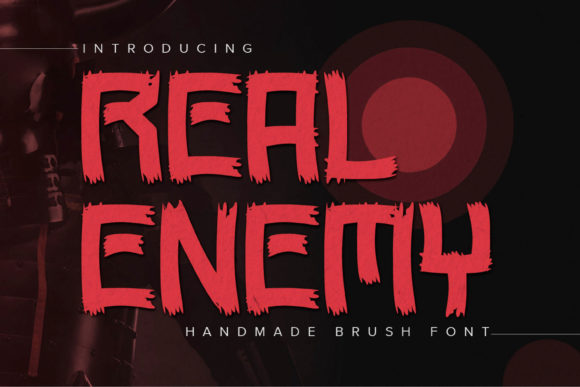
At first glance, Horrraaa grabs your attention with its dynamic strokes and uneven textures—hallmarks of authentic street art. Unlike standard fonts that rely on clean lines and uniformity, Horrraaa embraces imperfection. Its brushed letterforms give it a hand-painted look, reminiscent of urban murals and underground graffiti culture. This distinctive style makes it perfect for projects that aim to stand out from the crowd and make a strong visual impact.
The font's character set includes uppercase letters, numbers, and symbols, all crafted with the same raw energy. Each glyph has been designed to flow naturally, as if painted in one continuous motion. This fluidity enhances the sense of movement and spontaneity, which are key elements of both graffiti and modern streetwear branding.
Where Can You Use Horrraaa?
- T-Shirt Designs: Horrraaa is ideal for creating custom t-shirt graphics. Its high contrast and stylized form ensure readability while adding a rebellious flair. Pair it with minimalist backgrounds or let it pop against vibrant colors to create a statement piece.
- Sportswear Branding: With its energetic vibe, this font aligns well with sportswear aesthetics. It can be used for team names, slogans, or even product labels, giving a sense of power and speed.
- Logo Creation: For brands aiming to project a bold, youthful image, Horrraaa adds a modern edge. It works especially well when combined with other complementary fonts for layered designs or stacked text treatments.
- Advertising Campaigns: From posters to digital banners, Horrraaa helps create memorable ad visuals. Its graffiti-inspired style resonates with youth-oriented audiences and fits seamlessly into urban-themed promotions.
- Clothing Labels and Tags: When designing clothing tags or care labels, using Horrraaa can add a touch of personality without compromising functionality. Just make sure the size and spacing are optimized for legibility.
Why Designers Love Using Horrraaa
Designers often choose Horrraaa because it allows them to blend creativity with practicality. Here are some of the qualities that make it a go-to choice:
- Versatility: Despite its niche style, Horrraaa isn't limited to just one application. It adapts well across different media and platforms, including print and digital formats.
- High Impact: The font is built for visibility. Its thick strokes and exaggerated shapes help it cut through visual noise, making it excellent for headlines and large-format prints.
- Modern Aesthetic: As graffiti and street art continue to influence mainstream fashion and design, Horrraaa reflects this cultural shift with a contemporary, forward-thinking look.
- Brush Texture: The textured strokes mimic the brushwork of an artist, adding depth and dimension to any design. This tactile quality is hard to replicate with other digital fonts.
How to Style Horrraaa for Maximum Effect
While Horrraaa is powerful on its own, the way you use it can significantly affect the final result. Here are some styling tips to enhance your designs:
- Layering Techniques: Combine Horrraaa with subtle drop shadows, gradients, or overlays to simulate a more realistic graffiti effect. These enhancements can make your design feel like it was created on a city wall rather than a screen.
- Color Choices: Since the font already carries a dark and aggressive tone, consider pairing it with bright neon accents or contrasting pastel hues to highlight its features. This can also help guide the viewer’s eye toward important text elements.
- Spacing and Kerning: Due to its bold nature, proper spacing between characters is essential. Too much overlap can make the text hard to read, while too much space may reduce its intensity. Experiment with tight and loose layouts to find what suits your project best.
- Background Interaction: Horrraaa shines brightest when placed over simple or abstract backgrounds. Avoid overly busy patterns unless they’re intentional and contribute to the overall mood of the design.
Real-World Applications of Horrraaa
Let’s take a closer look at how real designers have successfully integrated Horrraaa into their workflows:
Example 1: Urban Clothing Brand
A local clothing brand specializing in skate wear adopted Horrraaa for their new line of hoodies and jackets. By placing the brand name in large, bold letters across the front, they immediately communicated a sense of rebellion and authenticity. The brushed texture added a handmade feel, which resonated strongly with their target audience.
Example 2: Music Festival Poster
A music festival aimed at showcasing underground hip-hop artists used Horrraaa for the event title. They paired it with a black-and-white photo collage and splashed it with red and yellow highlights. The result was a visually striking poster that felt alive and urgent—just like the music it promoted.
Example 3: Digital Ad for Sneaker Launch
A sneaker company launching a new collection targeted younger consumers by using Horrraaa in their social media ads. The font’s graffiti-style appearance aligned perfectly with their brand identity, and the animated versions of the font helped bring the designs to life on video platforms like TikTok and Instagram.
Considerations Before Choosing Horrraaa
While Horrraaa is a versatile and expressive font, it's not always the right fit. Here are a few things to keep in mind before incorporating it into your next project:
- Legibility: Because of its stylized form, Horrraaa is best suited for short texts like logos, headlines, or taglines. It may not be appropriate for body copy due to potential readability issues.
- Brand Image: Consider whether the graffiti aesthetic aligns with your brand’s values and messaging. If your brand is more traditional or professional, this font might not be the best match.
- Platform Compatibility: Always test the font on the intended platform (e.g., web, mobile, print) to ensure it renders correctly. Some devices or browsers may struggle with the complex outlines of certain glyphs.
- Usage Rights: Make sure to verify the licensing terms of Horrraaa. Commercial use typically requires a paid license, so avoid using it in live projects without confirming permissions.
Pairing Horrraaa with Other Fonts
When working with display fonts like Horrraaa, it's important to pair them carefully with supporting typefaces to maintain balance and harmony in the design. Here are some recommended pairings:
- Minimalist Sans-Serif: Clean, modern sans-serif fonts like Montserrat or Open Sans provide a nice contrast to Horrraaa’s wildness. This combination works well in designs where the graffiti font serves as a headline and the sans-serif supports subheadings or body text.
- Retro Serif: Mixing Horrraaa with a vintage serif font can create a compelling juxtaposition. Think of pairing it with something like Playfair Display for a retro-meets-modern look.
- Another Graffiti or Handwritten Font: For a cohesive street art theme, try layering Horrraaa with similar fonts such as Urban Jungle or Graffiti Black. However, be careful not to overdo it—too many styles can lead to visual clutter.
Integrating Horrraaa into Your Workflow
Using Horrraaa effectively involves more than just selecting the font—it's about integrating it into your design process. Here’s how to do it smoothly:
- Choose the Right Software: Most modern design tools like Adobe Illustrator, Photoshop, Figma, and Canva support custom fonts. Install Horrraaa on your system and import it into your preferred tool.
- Test on Different Sizes: Try applying Horrraaa at various sizes to see how it behaves. Larger sizes tend to showcase the font’s best features, while smaller sizes may lose clarity.
- Use Layer Effects: Add effects like stroke outlines, inner glows, or grain overlays to give your text a more dimensional and artistic look. These techniques can elevate the font’s visual appeal dramatically.
- Experiment with Color: Don’t stick to black alone. Try using white text over dark backgrounds or experimenting with translucent color layers for a graffiti mural effect.
Common Mistakes to Avoid
Even the most talented designers can fall into traps when using display fonts like Horrraaa. Here are a few common pitfalls to watch out for:
- Overuse: While Horrraaa is impactful, using it too frequently in a single design can overwhelm the viewer. Reserve it for key messages or focal points.
- Poor Contrast: Ensure the font stands out clearly against the background. Low contrast can render the text ineffective, no matter how cool it looks.
- Ignoring Scale: The font needs enough scale to show off its details. On small screens or printed materials, it may appear muddy or unclear if not sized properly.
- Forgetting the Message: Remember that typography should serve the content. Even though Horrraaa is visually exciting, it shouldn’t distract from the words themselves.
How to Source and Install Horrraaa
To start using Horrraaa in your projects, you’ll need to download it from a trusted font provider. Many designers source it from platforms like FontSpace, DaFont, or MyFonts. Always check the license agreement to determine whether it's suitable for commercial use.
Once downloaded, installing the font is usually straightforward. On Windows, double-click the font file and click "Install." On macOS, open the Font Book app and drag the font into the library. After installation, you can access Horrraaa in any supported design software.
Final Thoughts on Using Horrraaa
Horrraaa is more than just a font—it's a design element that embodies the spirit of street culture and modern minimalism. When used thoughtfully, it can transform a basic layout into a powerful visual statement. But like any creative tool, it demands respect and understanding to truly unlock its potential.
If you're looking to inject some attitude into your next design project, Horrraaa is worth considering. Just remember to balance its intensity with clear communication and thoughtful styling. The right approach will ensure your message is heard—and remembered.