Double Pineapple: A Playful Display Font for Creative Projects
In the world of design, typography plays a crucial role in capturing attention and conveying personality. Whether you're creating branding materials, social media graphics, or digital illustrations, choosing the right font can elevate your work from ordinary to extraordinary. One standout option that combines charm with functionality is Double Pineapple. This quirky and playful display font is perfect for those who want to infuse their designs with character while maintaining professional usability.
What Is Double Pineapple?
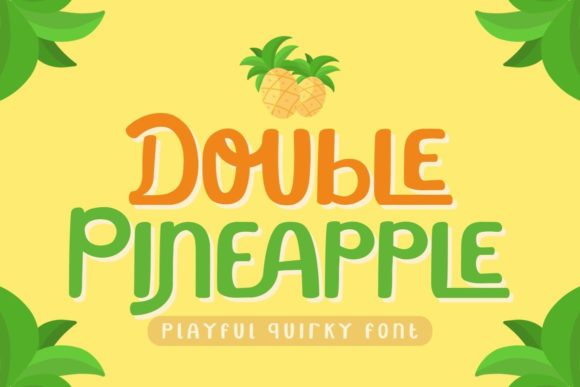
Double Pineapple is a bold, stylized display font designed to stand out in any composition. Its name alone hints at its fun and vibrant nature — much like the fruit it's named after, this font brings a refreshing twist to visual projects. With exaggerated letterforms and a whimsical aesthetic, Double Pineapple is ideal for headlines, logos, posters, and other elements where impact and creativity are key.
One of the most notable features of Double Pineapple is its PUA encoding, which stands for “Private Use Area.” This means all the glyphs, including alternate characters and decorative swashes, are easily accessible through your design software. You don’t need advanced technical knowledge to use them; simply open the font and select the desired character using the PUA menu. This accessibility makes it user-friendly for both seasoned designers and beginners looking to experiment with unique typefaces.
Common Design Challenges Solved by Double Pineapple
Many designers face challenges when trying to balance visual appeal with readability. Especially in the case of display fonts, which are often used for short text rather than long paragraphs, finding one that looks great without becoming too distracting can be tough. That’s where Double Pineapple shines. While it has a distinct personality, its structure remains clear enough to serve as an effective headline or title font.
- Brand Identity: If you’re designing a logo or brand assets for a creative business, a fun and memorable font like Double Pineapple can help reinforce your brand’s unique voice.
- Event Promotion: From birthdays to product launches, adding a touch of playfulness with this font can make promotional materials more engaging and eye-catching.
- Digital Content: Social media posts, YouTube thumbnails, and website headers often require a strong visual hook. Double Pineapple offers just that with its expressive style.
- Print Materials: For posters, invitations, and packaging, the font adds a sense of joy and originality that helps your message stand out.
How to Use Double Pineapple Effectively
To get the best results from Double Pineapple, consider the following practical tips:
- Use Sparingly: Because it’s a display font, it works best in small doses. Reserve it for headlines, titles, or accents rather than large blocks of text.
- Pair Thoughtfully: Combine it with a clean, legible sans-serif or serif font for body copy to maintain a balanced hierarchy. This ensures your message is both visually appealing and easy to read.
- Experiment with Swashes and Glyphs: Thanks to its PUA encoding, you can access a range of additional characters and flourishes. These can add flair to names, taglines, or special phrases.
- Adjust Spacing and Size: The playful nature of the font might require some tweaking in spacing or scale to fit well within your layout. Don’t hesitate to adjust kerning or leading for optimal presentation.
Real-World Applications and Outcomes
Here are some real-world examples of how Double Pineapple can enhance your creative output:
- Logo Design: A boutique bakery could use this font for its logo to evoke a sense of warmth and delight. The whimsy of the font aligns perfectly with a food-related brand identity.
- Social Media Graphics: When promoting a new line of colorful summer apparel, using Double Pineapple in the headline can create a lively and inviting mood.
- Wedding Invitations: For a rustic or bohemian-themed wedding, this font can bring a charming and personal feel to the design.
- Product Packaging: A children’s toy company might leverage the font to create a joyful and eye-catching label that stands out on store shelves.
Each of these applications demonstrates how the font can adapt to different contexts while consistently delivering a sense of energy and individuality.
Who Can Benefit from Using Double Pineapple?
While Double Pineapple is versatile, certain users will find it particularly valuable:
- Graphic Designers: Those working on branding, editorial design, or event materials can benefit from its ability to convey emotion and creativity quickly.
- Marketing Professionals: Creating campaigns that resonate with younger audiences or niche markets becomes easier with a font that feels fresh and dynamic.
- Creative Entrepreneurs: Artists, bloggers, and small business owners looking to build a unique online presence may find this font to be a powerful tool in their visual toolkit.
- Beginners in Typography: The ease of accessing alternate characters via PUA encoding makes it approachable for those still learning how to work with custom fonts.
Everyone from freelancers to agencies can integrate Double Pineapple into their workflow depending on the tone they wish to project. It’s especially useful for projects requiring a modern, youthful, or artistic vibe.
Considerations Before Implementation
Before diving into using Double Pineapple, there are a few things to keep in mind:
- Licensing: Ensure the font is properly licensed for commercial use if your project involves selling products or services. Always check the font provider’s terms before downloading.
- Color Usage: Given its playful nature, this font pairs beautifully with bright colors and soft pastels. Experiment with color combinations to highlight its unique features.
- Contrast Matters: Pair it with contrasting background colors or textures to ensure legibility and prevent it from getting lost in the design.
- Software Compatibility: Most design tools support PUA-encoded fonts, but it’s always a good idea to test the font in your preferred application before finalizing a project.
Getting Started with Double Pineapple
Implementing Double Pineapple into your next project is straightforward. Here’s a simple step-by-step guide:
- Download the font file from a trusted source or font marketplace.
- Install the font on your computer by double-clicking the .otf or .ttf file and following the prompts.
- Open your design software (such as Adobe Illustrator, Photoshop, or Canva) and select the font from the list.
- Access the PUA glyphs by typing a lowercase letter or number, then navigating the character map to choose a swash or alternate glyph.
- Apply the font to your design and tweak size, color, and spacing for the best effect.
With these steps, you’ll be able to harness the full potential of Double Pineapple in no time. Remember, practice makes perfect — experimenting with different layouts and pairings will help you discover what works best for your specific needs.
Why Choose Double Pineapple Over Other Fonts?
There are countless display fonts available, but what sets Double Pineapple apart is its blend of whimsy and professionalism. Unlike overly ornate scripts that can become hard to read, this font maintains a level of clarity that allows it to be functional even in its expressive form. Additionally, the inclusion of alternative characters gives you more creative control without the hassle of manually adjusting each element.
If you’re looking for something that breaks the mold of traditional typography, Double Pineapple is a smart choice. It’s not just about aesthetics — it’s about creating content that resonates with your audience and reflects your unique style.
Final Thoughts
Typography is more than just selecting a font — it’s about making a statement. Double Pineapple offers a fresh, bold way to express creativity while staying true to the fundamentals of good design. Whether you’re crafting a logo, designing a poster, or editing a video, this font provides the versatility and flair needed to leave a lasting impression.
By understanding the purpose and strengths of Double Pineapple, you can confidently incorporate it into your workflow. As with any design decision, context matters — use it where it can shine and let its playful spirit enhance your message. The result? Designs that are not only visually compelling but also aligned with your creative goals.