Dotoria: A Cool, Thick-Lettered Display Font for Professional and Creative Projects
If you're looking to make a bold visual impact with your designs, Dotoria is a font that deserves serious consideration. With its thick lettering and brushed texture, this display font adds a unique flair to any project—whether it's branding materials, marketing campaigns, blog headers, or creative presentations. But while Dotoria can be an incredible asset, using it effectively requires more than just downloading and applying it anywhere. In this article, we’ll explore what makes Dotoria stand out, common pitfalls to avoid, and how to use it in ways that truly elevate your work.
What Makes Dotoria Unique?
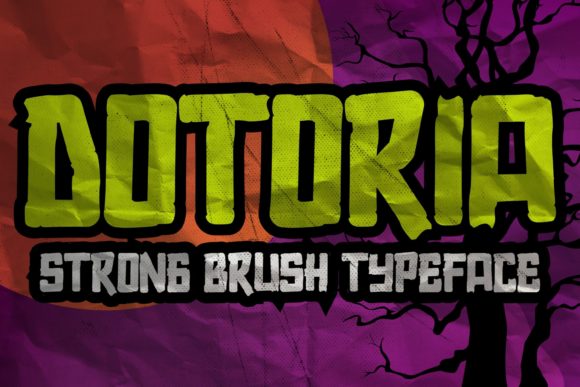
Dotoria is designed to grab attention. Its thick strokes and soft brush-like edges give it a handcrafted feel, making it perfect for modern, artistic, or high-impact layouts. Unlike many standard sans-serif or serif fonts, Dotoria is a display font, meaning it’s best suited for headlines, titles, and other large text elements rather than body copy.
This font works particularly well in digital and print media where aesthetics play a key role. It’s often used by designers who want to add personality to logos, posters, website banners, and social media graphics. The versatility of Dotoria allows it to blend into both minimalist and vibrant design schemes, depending on how it’s applied.
1. Overusing It in Small Text Sizes
One of the biggest mistakes people make when they download Dotoria is trying to use it in small sizes—like captions or footnotes. Because it’s a thick-lettered display font, it loses clarity and readability at lower sizes. This can lead to a confusing or unprofessional look, especially if the audience has to squint to read the content.
Better approach: Reserve Dotoria for headlines, subheadings, and large call-to-action buttons. For smaller text, pair it with a clean, legible font such as Lato, Open Sans, or Montserrat to maintain hierarchy and readability.
2. Ignoring Color Contrast
The boldness of Dotoria doesn’t mean it can tolerate poor color choices. Many users overlook the importance of background and text color contrast, which can cause the font to appear washed out or too harsh. This is especially true when using it in web design or video overlays.
Better approach: Always test Dotoria against different backgrounds. Use tools like WebAIM’s Contrast Checker or simply apply it to black, white, and neutral tones to see which combinations provide the clearest visibility without sacrificing style.
3. Not Checking Licensing Before Use
Display fonts like Dotoria are powerful, but they also come with licensing considerations. Some versions are free for personal use only, while others require commercial licenses for use in websites, apps, or products sold for profit. Failing to verify the license can lead to legal issues or wasted resources if you have to switch fonts later.
Better approach: Before purchasing or downloading Dotoria, check the licensing terms provided by the creator or marketplace. If you’re unsure, contact the vendor for clarification. Investing in the right license upfront saves time and headaches down the line.
Choosing the Right Project Type
Because Dotoria is a display font, it shines brightest in projects that prioritize visual appeal over dense reading. Here are some ideal applications:
- Logos and brand identities
- Social media posts and advertisements
- Website headers and landing pages
- Printed posters, flyers, and event invitations
- Product packaging and promotional materials
Using it in these contexts ensures that the font’s stylistic features are visible and impactful. However, using it for long paragraphs or fine print can backfire, so always consider the purpose before applying it.
Pairing Dotoria with Complementary Fonts
A strong typographic pairing enhances the overall design and keeps the message clear. Dotoria’s thickness and texture make it a great match with lighter, more structured fonts. For example:
- Dotoria + Poppins: A modern, sleek combination for tech or lifestyle brands.
- Dotoria + Merriweather: Adds a touch of elegance for editorial or fashion content.
- Dotoria + Raleway: Balances bold headings with crisp body text for web and app interfaces.
These pairings help maintain a balance between creativity and usability. They ensure your message remains accessible while still standing out visually.
Optimizing for Different Platforms
Another overlooked aspect is how Dotoria performs across various platforms and devices. While it looks stunning on desktops and tablets, mobile responsiveness is crucial. The thick strokes might not render well on low-resolution screens, and the spacing could become an issue on narrow displays.
Better approach: Test your design with Dotoria on multiple devices and screen sizes. Adjust the font size, leading, and tracking accordingly. You may also want to use fallback fonts in CSS to ensure readability even if Dotoria fails to load properly.
Not Testing Across Browsers and Operating Systems
Fonts don’t always look the same everywhere. Dotoria may appear slightly different on Windows versus macOS, or in Chrome compared to Safari. This inconsistency can affect your brand’s visual identity, especially if you rely heavily on typography in your online presence.
Tip: Always preview Dotoria on all major browsers and OS platforms. If you notice significant differences, consider whether the font is the best fit for cross-platform consistency.
Misunderstanding What “Brushed” Means
“Brushed” refers to the font’s texture and appearance, which mimics hand-brushed lettering. While this gives it a dynamic, organic feel, it can sometimes introduce visual inconsistencies—especially in automated environments like email clients or CMS systems. Users might not expect slight variations in stroke weight or character shape across different outputs.
Correction: Understand that Dotoria’s brushed style is part of its charm, but it may not align perfectly with rigid grid-based layouts. Use it in places where variation adds character rather than detracts from precision.
Example 1: Brand Identity for a Coffee Shop
A local coffee shop wanted a warm, inviting logo that stood out from competitors. By using Dotoria in a larger size with a soft brown gradient, they created a friendly yet professional mark. The font’s thickness gave it a sturdy, trustworthy feel, while the brushed texture added a touch of artisanal quality.
Outcome: Increased customer engagement and a cohesive visual theme across menus, signage, and packaging.
Example 2: Social Media Marketing Campaign
A fitness influencer was launching a new product and needed a striking headline. She used Dotoria in bright neon pink over a dark blue background. However, she initially tried using it in smaller text for testimonials and quickly realized it wasn’t readable. After switching to a secondary font for body text, the campaign became much more effective.
Outcome: Improved readability led to higher click-through rates and better audience interaction.
Things to Check Before Committing to Dotoria
- License Compatibility: Make sure the font is appropriate for your intended use—personal or commercial.
- Accessibility Standards: Confirm that it meets contrast requirements for WCAG (Web Content Accessibility Guidelines).
- Platform Support: Ensure it works well on all platforms your audience will encounter it on.
- Design Context: Consider whether the font supports your brand voice and project goals.
- Technical Performance: Test loading times and rendering issues, especially if using it on a website or app.
Final Thoughts on Choosing Dotoria
While Dotoria offers a compelling mix of style and strength, its success depends on thoughtful application. By avoiding common missteps—like using it inappropriately for small text, ignoring licensing, or failing to test across platforms—you can harness its full potential without compromising user experience or professionalism.
Whether you’re a seasoned designer or just starting out, adding Dotoria to your font library is a smart move—but only when used correctly. Take the time to understand its strengths and limitations, and you’ll find that it becomes a versatile and valuable tool in your creative arsenal.